The badge that let itself in
At 7:52 a.m. on a Tuesday in March, a man in a hi-vis vest and a lanyard clipped to a branded polo shirt walked up to the staff entrance of a 340-person fintech company I'll call Meridian Ledger. He was carrying a box of what looked like router equipment and had his hands full. A genuine employee, badge already out, held the door. "Thanks, mate," he said, and followed her in.
He never used a badge. He never spoke to reception. He walked past the open-plan floor, found an unlocked comms cupboard next to the third-floor kitchen — the one nobody thought to secure because "it's just switches" — and plugged a small Raspberry Pi-based implant into a spare Ethernet port. Total time on premises: eleven minutes. He was gone before the 8:15 stand-up.
Meridian Ledger found the device six weeks later during an unrelated network audit, by which point it had been quietly beaconing to an external host and had captured enough internal traffic to map their VLAN structure and harvest a set of service-account credentials. The incident response, forensic review, mandatory breach notifications to two regulators, and the client-facing remediation program cost the company just under $890,000 — and that's before counting the two enterprise clients who quietly declined to renew.
Nothing about this attack involved a firewall misconfiguration, a phishing email, or a zero-day. It involved a door, a lanyard, and a comms cupboard. That's the uncomfortable truth about physical security: it's the control family most organizations assume "doesn't apply to us" because we're all cloud-first now — right up until someone walks in the front door.
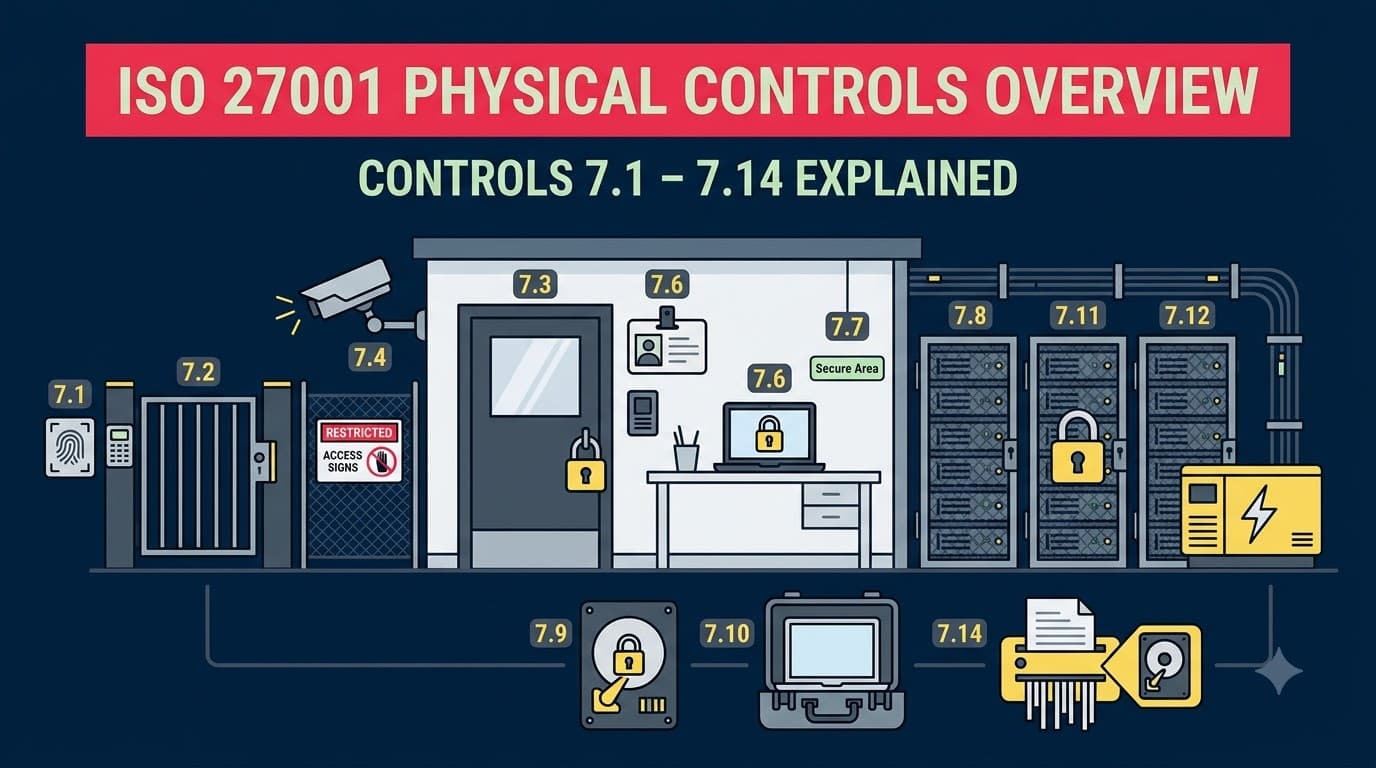
ISO/IEC 27001:2022's Annex A dedicates an entire theme to exactly this problem. Fourteen controls, numbered 7.1 through 7.14, cover everything from perimeter fencing to how you wipe a decommissioned laptop. This article is the map of that theme — what each control requires, what "good" looks like in practice, how the picture changes when your infrastructure lives in someone else's data centre, and how to prioritize your effort based on the environment you actually operate in.
Who this is for
This overview is written for ISMS implementers, security managers, facilities and IT operations leads, and consultants who need to speak fluently about all fourteen Physical controls — whether they're drafting a Statement of Applicability, prepping for a Stage 1 audit, or explaining to a skeptical CFO why the server room door needs a proper access-control reader instead of a keypad with a sticky-note code taped beside it. You'll walk away knowing exactly what each control demands, what evidence an auditor will want to see, how much of it you can legitimately hand off to a cloud or colocation provider, and where to focus first depending on whether you run an office, a data centre, a cloud-only stack, or some hybrid of all three. If you're tracking your broader ISMS documentation build alongside this theme, PentesterWorld's Mandatory Documents Checklist is a useful companion for confirming which physical-security records are expected as formal ISMS documentation versus supporting evidence.
The physical theme, and the shared-responsibility reality
Annex A groups its 93 controls into four themes: Organizational (5.1–5.37), People (6.1–6.8), Physical (7.1–7.14), and Technological (8.1–8.34). The Physical theme is the smallest of the four by count, but it's disproportionately easy to under-invest in, because most of the controls it covers feel like "facilities' job" rather than "security's job." That gap between ownership and accountability is exactly where incidents like Meridian Ledger's happen.
The other complicating factor is the one every modern organization runs into almost immediately: most companies today don't own a data centre. Their production workloads sit in AWS, Azure, or Google Cloud; their offices are leased floors in a shared building; their staff work from kitchen tables in four different countries. Does that mean the Physical theme doesn't apply? No — it means responsibility for each control shifts, sometimes entirely, to a third party. ISO 27001 doesn't let you simply delete a control from your Statement of Applicability because "we're in the cloud." It requires you to determine, document, and justify how each control is satisfied — including by inheritance from a supplier, under the supplier-security controls at 5.19 through 5.23.
That's the thread running through this entire article: every one of the fourteen controls below gets a "Cloud/colo note" telling you whether you own it outright, share it, or inherit it — and later on we'll walk through exactly how to document that inheritance in your SoA so an auditor doesn't flag it as a silent gap.
"The number one physical-security finding I write up in Stage 1 audits isn't a missing camera or a broken lock. It's a Statement of Applicability that says '7.1 through 7.14: not applicable, we're cloud-based' with zero justification. That's not an exclusion, that's a shrug — and auditors don't accept shrugs." — Priya Nakamura, Lead Auditor, Cascade Certification Partners
How the Physical theme fits into the rest of Annex A
It's worth pausing on where Physical sits relative to the other three Annex A themes before diving into the fourteen controls themselves, because none of them operate in isolation. The ISO 27001 Annex A Organizational Controls: Complete Overview (5.1–5.37) sets the governance backbone — policies, roles, asset inventories, supplier oversight — that every Physical control ultimately depends on. You can't run a defensible visitor-logging process under 7.2, for instance, without the role definitions established under Organizational control 5.2. Similarly, the ISO 27001 People Controls Overview: Controls 6.1–6.8 Explained governs the humans who walk through the doors the Physical theme protects — screening under 6.1, awareness training under 6.3, and remote working policy under 6.7 all shape whether the physical controls in this article actually hold up in practice or exist only on paper.
If you're new to the terminology used throughout this article — terms like "security perimeter," "sanitization," or "chain of custody" — the ISO 27001 Terminology and Glossary: Key Terms Every Practitioner Should Know is worth keeping open in a second tab as you work through your own implementation.
It's also useful to know that "physical security" isn't a concept unique to ISO 27001 — every major security and privacy framework addresses it, just with different emphasis and different mandatory language. If your organization is pursuing more than one framework simultaneously, which is increasingly common, understanding where the requirements overlap saves real implementation effort.
Framework | How it treats physical security | Overlap with ISO 27001 Physical theme |
|---|---|---|
SOC 2 | Physical Access Controls under the Security (Common Criteria) trust service category | High — CC6.4 and related criteria map closely to 7.1–7.4 |
PCI DSS | Requirement 9: Restrict physical access to cardholder data | High — media handling and disposal requirements mirror 7.10 and 7.14 closely |
HIPAA Security Rule | Physical Safeguards standard (facility access controls, workstation security, device/media controls) | High — workstation security maps to 7.7/7.8; device and media controls map to 7.9/7.10/7.14 |
NIST CSF | Protect function, PR.AC and PR.PT categories reference physical access | Medium — less prescriptive, more outcome-based than ISO 27001's explicit 14-control structure |
GDPR | Article 32 requires "appropriate technical and organisational measures," physical security implied but not detailed | Low-to-medium — GDPR doesn't specify physical controls directly, but a documented ISO 27001 Physical theme supports Article 32 evidence |
If your organization is also pursuing SOC 2, our companion guide on SOC 2 physical access controls walks through the trust-service-criteria mapping in more depth, and organizations in the payment space should also review PCI DSS Requirement 9 physical access controls alongside this article, since a well-documented ISO 27001 Physical theme typically satisfies the bulk of both frameworks' physical evidence requirements with only minor additions.
"Clients pursuing SOC 2 and ISO 27001 in the same year are always relieved to learn the physical evidence largely overlaps. A visitor log is a visitor log — you don't need two different ones because two different auditors are going to ask for it." — Tobias Lindqvist, Data Centre Operations Director, Nordkyn Colocation
Grouping the fourteen controls
We'll walk through the controls in four practical clusters rather than strictly numerical order for the narrative, though every control gets its own detailed table:
Perimeter and entry (7.1–7.3) — who and what gets in the building at all.
Monitoring and environmental protection (7.4–7.6) — watching the space and protecting it from fire, flood, power loss, and unauthorized behavior once people are inside.
Workspace discipline (7.7) — clear desk and clear screen, the one control that lives at every single employee's fingertips.
Equipment, media, and lifecycle (7.8–7.14) — protecting the hardware and data itself, from where it sits to how it dies.
Let's go control by control.
Cluster 1: Perimeter and entry (7.1–7.3)
This is the outermost ring of physical defense — the fence, the door, and the walls around the specific rooms that matter most. Get this cluster wrong and every other control in the theme becomes academic, because an attacker who's already inside the building doesn't need to defeat your cabling security policy. For a full control-by-control walkthrough of this cluster with floor-plan-level detail, see Physical Security Perimeters and Entry Controls: ISO 27001 Controls 7.1–7.3; this overview covers the essentials.
These three controls also tend to be the first thing an ISO 27001 lead auditor physically tests on the day of a site visit, well before they open your policy binder. They'll ask to be badged in as a visitor, watch how reception handles the request, and often ask, unprompted, to see whatever room holds your servers or network equipment. If that walk-through goes smoothly, it sets a tone of confidence for the rest of the audit. If it doesn't — if the auditor gets waved through without a badge, or the "server room" turns out to be an unlocked closet — every subsequent control gets scrutinized more closely, because the auditor has just learned something about how seriously the organization treats the entire theme.
7.1 Physical security perimeters
Control 7.1 requires that organizations define and use security perimeters to protect areas containing information and other associated assets. In plain terms: draw a line — a wall, a fence, a locked door — around anything that matters, and make sure that line is actually defended, not just conceptual.
Element | Detail |
|---|---|
Control | 7.1 Physical security perimeters |
What it requires | Defined, physically enforced boundaries around premises, buildings, and sensitive areas, sized appropriately to the value of what's inside |
What good looks like | Documented perimeter map; walls that run slab-to-slab (not just to a false ceiling); controlled points of entry; perimeter reviewed whenever premises change |
Cloud/colo note | Fully inherited from the cloud provider or colocation facility for hosted infrastructure — but the office perimeter around your own staff remains yours |
Evidence | Facility floor plans, perimeter definition document, lease/security addenda, provider physical-security attestation (e.g., SOC 2 Type II, ISO 27001 certificate) |
The classic audit failure here is the "false ceiling gap" — a wall that looks solid from the office floor but stops at the suspended ceiling tiles, leaving eighteen inches of open crawl space into the next tenant's suite. I've seen this exact finding at three different clients over the years, all of whom had passed a prior audit because nobody physically climbed a ladder to check.
7.2 Physical entry
Control 7.2 requires that secure areas be protected by appropriate entry controls and access points. This is where badge readers, visitor sign-in, PIN pads, biometric scanners, and reception desks live.
Element | Detail |
|---|---|
Control | 7.2 Physical entry |
What it requires | Entry controls proportionate to the sensitivity of the area, applied to employees, visitors, and third parties alike, with all access logged and reviewed |
What good looks like | Individually assigned badges (no shared credentials); visitor escort policy; tailgating awareness built into onboarding; access logs retained and periodically reviewed; badge deactivation as part of the leaver process |
Cloud/colo note | Data-centre entry (mantraps, biometrics, guards) inherited from the provider; office entry remains fully your responsibility |
Evidence | Access control system logs, visitor register, badge issuance/deactivation records, tailgating incident reports |
Meridian Ledger's opening scenario is a textbook 7.2 failure — not because they lacked a badge reader, but because the culture around it ("holding the door is polite") undermined the control entirely. The fix isn't more hardware; it's training staff that closing the door on a stranger, even an awkward one, is the expected behavior, and giving reception real authority to challenge unbadged visitors.
"I ask every client the same question in kickoff: if I showed up right now holding a pizza box and said I was delivering lunch to the third floor, would anyone stop me? Half the time the answer is an uncomfortable silence." — Derek Osei, Physical Security Consultant, Ironhold Advisory
7.3 Securing offices, rooms and facilities
Control 7.3 goes one level deeper than the building perimeter: it requires specific physical security for offices, rooms, and facilities based on what's inside them. A server closet needs more than the badge reader that gets you into the building lobby.
Element | Detail |
|---|---|
Control | 7.3 Securing offices, rooms and facilities |
What it requires | Additional, risk-appropriate physical protection for rooms holding sensitive information, equipment, or processing facilities — server rooms, comms closets, HR/finance offices, archive rooms |
What good looks like | Server rooms and comms cupboards locked separately from general office access; sensitive rooms not signposted externally; key/badge access lists reviewed quarterly; no unsecured "junk" rooms holding live network equipment |
Cloud/colo note | Inherited for hosted server rooms; fully your responsibility for on-premises comms closets, print rooms handling sensitive documents, and any local server equipment |
Evidence | Room-level access lists, lock/key registers, signage policy, facility risk assessment identifying sensitive rooms |
A dedicated deep-dive on this specific control — Securing Offices, Rooms, and Facilities: ISO 27001 Control 7.3 — covers the full range of scenarios, from open-plan floors to shared-tenancy buildings. The pattern I see most often here is exactly what caught out Meridian Ledger: the comms cupboard nobody treats as a "room" in the ISO 27001 sense because it doesn't look like an office. Any space with live network infrastructure, a patch panel, or a server rack needs to be on your 7.3 inventory, full stop.
Cluster 2: Monitoring and environmental protection (7.4–7.6)
Once you've defined and locked down your perimeter and your sensitive rooms, the next question is: how do you know if something goes wrong inside that boundary, and how do you make sure the environment itself — fire, flood, power, temperature — doesn't take out your assets before an attacker ever gets the chance? None of the three controls in this cluster have a dedicated deep-dive article yet on this list, so this overview is currently the most complete resource covering them — treat the sections below as your primary reference until a standalone piece exists.
This cluster is also where the Physical theme intersects most directly with resilience and safety obligations that exist independently of ISO 27001 — fire codes, building regulations, and occupational health and safety law. That overlap is useful: a lot of the evidence you need for 7.4, 7.5, and 7.6 already exists somewhere in your facilities function, generated for reasons that have nothing to do with information security. The job of the ISMS is usually not to create these records from scratch but to find them, reference them, and make sure they're reviewed on a cadence that satisfies both the fire marshal and the certification auditor.
7.4 Physical security monitoring
Control 7.4 is new in the 2022 revision of ISO 27001, and it exists because the older standard's guidance on monitoring was scattered and thin. It now explicitly requires that premises be continuously monitored for unauthorized physical access.
Element | Detail |
|---|---|
Control | 7.4 Physical security monitoring |
What it requires | Continuous monitoring (CCTV, intrusion detection, alarm systems, guarding) of premises for unauthorized access, tied to an alerting and response process — not just recording for after-the-fact review |
What good looks like | Camera coverage of all entry/exit points and sensitive rooms; footage retained per a defined policy (commonly 30–90 days); alarm system tested on a schedule; monitoring alerts routed to someone who actually responds, not just a dashboard nobody watches |
Cloud/colo note | Data-centre monitoring is inherited from the provider (verify via SOC 2 report or ISO 27001 certificate scope); office monitoring is entirely yours |
Evidence | CCTV coverage map, footage retention policy, alarm test logs, monitoring alert/response records, guard patrol logs where applicable |
Because 7.4 is new, it's the control most likely to be missing entirely from an organization's pre-2022 documentation. If your ISMS was built under the 2013 revision and simply carried forward, check specifically for this gap — auditors trained on the 2022 update are actively looking for it.
7.5 Protecting against physical and environmental threats
Control 7.5 requires protection against physical and environmental threats such as fire, flood, earthquake, storm, explosion, civil unrest, and other forms of natural or man-made disaster.
Element | Detail |
|---|---|
Control | 7.5 Protecting against physical and environmental threats |
What it requires | A documented risk assessment of environmental threats relevant to each site, plus proportionate mitigations — fire suppression, flood barriers, seismic bracing, backup generators, geographic redundancy for critical facilities |
What good looks like | Fire detection and suppression systems tested annually; server rooms raised off ground-floor flood risk or protected accordingly; disaster recovery site geographically separated from the primary; threat assessment revisited after site changes or regional events |
Cloud/colo note | Almost entirely inherited from major cloud providers, who build multi-availability-zone redundancy into their offering — but you still own the assessment of your office and any on-prem equipment |
Evidence | Site environmental risk assessment, fire system inspection/test certificates, DR site documentation, provider resiliency/uptime SLA documentation |
This is the control most directly linked to business continuity — it pairs closely with Business Continuity and ICT Readiness: ISO 27001 Controls 5.29–5.30, since a fire in your server room is both a physical-security event and a continuity event. Treat them as two views of the same risk, not separate programs.
7.6 Working in secure areas
Control 7.6 requires that procedures for working in secure areas be designed and applied — covering the human behavior inside a sensitive room, not just the door that leads into it.
Element | Detail |
|---|---|
Control | 7.6 Working in secure areas |
What it requires | Rules for what can happen inside secure areas: no unsupervised third-party work, no unauthorized recording devices, no unattended sensitive material, defined procedures for maintenance staff and visitors who must enter |
What good looks like | Written secure-area working procedures; sign-in/sign-out for anyone entering a server room including staff; escort requirement for vendors doing hardware work; phone cameras and USB devices restricted in the highest-sensitivity rooms |
Cloud/colo note | Provider's own staff procedures apply inside their data centres (verify via their compliance documentation); relevant on-prem for any server room, network operations centre, or secure archive your organization operates |
Evidence | Secure-area working procedure document, server-room sign-in logs, vendor escort records, induction material for anyone with secure-area access |
I flag 7.6 specifically because it's the control most often confused with 7.2 (entry) and 7.3 (securing the room). Those two get you into the space; 7.6 governs what you do once you're there. An auditor testing this control will often ask to see the sign-in sheet for the server room and then ask a maintenance vendor's last visit date — if there's no record of who was in the room or what they did, that's a 7.6 gap even if the door itself is perfectly secured.
"7.6 is the control everyone forgets exists because it doesn't map to a piece of hardware you can buy. It's a procedure. And procedures are exactly what falls apart under deadline pressure, which is precisely when a contractor gets left alone in the server room 'just for ten minutes.'" — Marcus Feldman, ISMS Manager, Northgate Analytics
Cluster 3: Workspace discipline (7.7)
Every other control in this article is something the organization builds, buys, or contracts for — a badge system, a camera, a UPS. Control 7.7 is different: it's the one control that lives entirely in individual behavior, repeated hundreds of times a day across every desk, meeting room, and home office the organization touches. That makes it simultaneously the cheapest control in the entire theme to implement on paper and one of the hardest to sustain in practice, because habits erode faster than hardware fails.
7.7 Clear desk and clear screen
Control 7.7 is the one Physical control that touches literally every employee, every day, regardless of role, seniority, or whether they ever set foot in a server room. It requires clear desk rules for papers and removable storage media, and clear screen rules for information processing facilities.
Element | Detail |
|---|---|
Control | 7.7 Clear desk and clear screen |
What it requires | Sensitive documents not left visible on desks when unattended; screens locked automatically after a defined idle period; printers cleared promptly; whiteboards wiped after sensitive discussions |
What good looks like | Automatic screen lock (2–5 minutes idle) enforced by policy on all endpoints; lockable storage for anyone handling paper records; "secure print" release on shared printers; end-of-day desk sweeps in higher-sensitivity teams (finance, HR, legal) |
Cloud/colo note | Not inherited — this is a human-behavior control that applies wherever your staff sit, in an office, at home, or in a co-working space |
Evidence | Clear desk/clear screen policy, screen-lock configuration (Group Policy/MDM settings export), periodic desk-sweep audit results, printer secure-release configuration |
Because this control costs almost nothing to implement — it's mostly policy, training, and an operating-system setting — it's simultaneously one of the cheapest controls to get right and one of the most commonly flagged as inconsistent during audits. A walk-through at 6 p.m. on a random Thursday tells an auditor more about your real culture than any policy document. A full deep-dive on this control, including remote-work nuances, lives at Clear Desk and Clear Screen Policy: ISO 27001 Control 7.7.
Cluster 4: Equipment, media, and lifecycle (7.8–7.14)
The final cluster covers the physical hardware and the data riding on it, from the moment a device is installed through to the moment it's destroyed or resold. This is where a huge amount of real-world risk concentrates, because equipment moves — it leaves the building in laptop bags, it gets shipped to a repair vendor, it ends up in a skip behind the building after a refresh cycle. A dedicated walkthrough of this cluster's operational detail is available at Equipment Security and Maintenance: ISO 27001 Controls 7.8–7.13; this section covers all seven controls including 7.14, which sits outside that article's scope.
Seven controls in a single cluster is a lot to hold in your head at once, so it helps to think of them as three sub-groups: where equipment lives and how it's powered (7.8, 7.11, 7.12), what happens to equipment once it leaves the building (7.9, 7.10), and what happens to equipment at the end of its working life (7.13, 7.14). Most of the audit findings I write against this cluster fall into that last sub-group — organizations invest heavily in siting and protecting equipment while it's in active use, then lose track of it entirely the moment it's scheduled for retirement.
7.8 Equipment siting and protection
Control 7.8 requires that equipment be sited and protected to reduce the risks from environmental threats and hazards, and opportunities for unauthorized access.
Element | Detail |
|---|---|
Control | 7.8 Equipment siting and protection |
What it requires | Equipment positioned away from environmental hazards (windows, water pipes, high-traffic areas) and away from casual public view; server racks not visible from reception or street-facing windows |
What good looks like | Server equipment in dedicated, access-controlled rooms away from plumbing risk; screens in customer-facing areas angled away from visitor sightlines; network equipment not stored under desks or in open cabinets |
Cloud/colo note | Fully inherited for cloud-hosted infrastructure; applies to any local servers, network gear, and workstation placement in shielded/customer-facing areas |
Evidence | Equipment location inventory, facility layout diagrams, siting risk assessment for any local server room |
7.9 Security of assets off-premises
Control 7.9 requires that off-site assets be protected — a control that has become dramatically more relevant since remote and hybrid work became the default rather than the exception.
Element | Detail |
|---|---|
Control | 7.9 Security of assets off-premises |
What it requires | Policy and controls for equipment used outside company premises: laptops at home, devices in transit, hardware at trade shows or client sites |
What good looks like | Full-disk encryption mandatory on all portable devices; remote-wipe capability via MDM; asset tracking that covers off-site location, not just on-network status; clear rules on leaving devices in vehicles or unattended in public |
Cloud/colo note | Not inherited — this is entirely your organization's responsibility regardless of where your infrastructure lives, since it concerns endpoints your staff physically carry |
Evidence | Off-premises equipment policy, MDM enrollment and encryption status reports, asset register with location tracking, remote-work security agreement signed by staff |
This control connects directly to Disciplinary Process and Remote Working Security: ISO 27001 Controls 6.4–6.7, since remote working policy and off-premises asset security are two halves of the same conversation. A stolen laptop from a coffee shop is a 7.9 event with a 6.7 policy behind it.
7.10 Storage media
Control 7.10 requires that storage media be managed through its lifecycle — acquisition, use, transportation, and disposal — in line with the organization's classification scheme.
Element | Detail |
|---|---|
Control | 7.10 Storage media |
What it requires | Procedures covering media handling, storage, transport, and disposal, aligned to information classification; controls on removable media (USB drives, external disks, backup tapes) |
What good looks like | Removable media use restricted or disabled by default via endpoint policy; encrypted media required for anything leaving the building; chain-of-custody logs for physical media in transit; classification-aware handling (a USB drive holding public marketing assets is not treated like one holding customer PII) |
Cloud/colo note | Physical backup-tape and disk handling is inherited if your provider manages backups; you retain responsibility for any USB drives, external HDDs, or removable media your own staff use |
Evidence | Media handling policy, removable-media restriction configuration (DLP/endpoint policy export), transport chain-of-custody logs, media disposal certificates |
7.11 Supporting utilities
Control 7.11 requires that information processing facilities be protected from power failures and other disruptions caused by failures in supporting utilities.
Element | Detail |
|---|---|
Control | 7.11 Supporting utilities |
What it requires | Protection of power, telecommunications, water, gas, and HVAC supply to information-processing facilities, including backup capacity for critical systems |
What good looks like | UPS and generator backup for server rooms, tested on a schedule; redundant internet/telecom links for critical sites; HVAC systems monitored with alerting for temperature/humidity drift; documented failover test results |
Cloud/colo note | Fully inherited for cloud-hosted workloads (this is a core part of what you're paying a hyperscaler for); fully your responsibility for any office server room or on-prem equipment |
Evidence | UPS/generator maintenance and test logs, HVAC monitoring records, utility redundancy design documentation, provider SLA/uptime commitments for hosted infrastructure |
7.12 Cabling security
Control 7.12 requires that cables carrying power, data, or supporting information services be protected from interception, interference, or damage.
Element | Detail |
|---|---|
Control | 7.12 Cabling security |
What it requires | Physical protection for network and power cabling — conduit, locked cabinets, separation of power and data lines, protection against accidental damage and deliberate tampering |
What good looks like | Structured cabling in conduit or trunking, not run loose across floors; patch panels in locked cabinets; power and network cabling physically separated to reduce interference and tampering risk; cable runs documented and periodically inspected |
Cloud/colo note | Fully inherited for hosted infrastructure; applies to office network cabling, especially the exact comms-cupboard scenario from this article's opening story |
Evidence | Cabling diagrams, cabinet lock/access records, cabling installation standards documentation, periodic cabling inspection reports |
Cabling security is the control most directly implicated in the Meridian Ledger breach — an unlocked comms cupboard with an accessible spare port is precisely what 7.12, paired with 7.3, is designed to prevent.
7.13 Equipment maintenance
Control 7.13 requires that equipment be correctly maintained to ensure availability, integrity, and confidentiality of information.
Element | Detail |
|---|---|
Control | 7.13 Equipment maintenance |
What it requires | Scheduled maintenance per manufacturer specification; maintenance performed only by authorized personnel; records kept of all maintenance and repair activity; sensitive data removed or protected before equipment leaves the premises for repair |
What good looks like | Maintenance contracts with vetted vendors; data-bearing devices either wiped before external repair or repaired only under supervision; maintenance log tied to the asset register; faults and repairs tracked for pattern analysis |
Cloud/colo note | Fully inherited for cloud-hosted hardware; applies to all owned equipment including office printers, network gear, and end-user devices sent for repair |
Evidence | Maintenance schedules and completion records, vendor maintenance contracts, pre-repair data sanitization records, asset register cross-referenced with maintenance history |
7.14 Secure disposal or re-use of equipment
Control 7.14 requires that equipment containing storage media be verified to ensure sensitive data and licensed software have been removed or securely overwritten prior to disposal or re-use.
Element | Detail |
|---|---|
Control | 7.14 Secure disposal or re-use of equipment |
What it requires | Verified data sanitization (wipe, degauss, or physical destruction, matched to media type and data sensitivity) before any device is resold, recycled, donated, or scrapped, plus removal of asset tags and licensing |
What good looks like | Certified data-destruction vendor with chain-of-custody and destruction certificates; sanitization method matched to classification (a device that held top-tier confidential data gets destruction, not just a wipe); disposal records tied back to the asset register so nothing goes missing off-book |
Cloud/colo note | Fully inherited for cloud infrastructure — verify via your provider's data-deletion and hardware-disposal attestations (often referenced under their SOC 2 or ISO 27001 scope); fully your responsibility for every laptop, phone, server, and drive your organization physically owns |
Evidence | Certificates of data destruction, disposal vendor contracts and audit records, asset register showing disposal date and method, sample sanitization verification logs |
I've seen more surprise findings tied to 7.14 than almost any other Physical control, because it's the one that happens after a device stops being anyone's daily responsibility. Laptops sit in a "to be wiped" pile in a supply closet for eight months. Old servers get handed to a well-meaning employee's cousin who "does IT recycling." Neither scenario produces a destruction certificate, and both are exactly what an auditor will ask to see evidence against.
"The disposal pile is where I find the most uncomfortable surprises. I once found a decommissioned NAS in a storage closet, still holding two years of unencrypted customer invoices, sitting there for eleven months because nobody 'owned' getting rid of it properly." — Renata Okoye, Senior Security Consultant, Vantage Point Security
Visualizing the fourteen controls as concentric zones
The clearest way to explain the Physical theme to a non-specialist stakeholder — a facilities manager, a CFO, a new board member — is as a series of concentric zones, each one adding a layer of control as you move from the public street to the most sensitive asset in the building.
graph TD
    A["Zone 0: Public Perimeter<br/>7.1 Physical security perimeters"] --> B["Zone 1: Controlled Entry<br/>7.2 Physical entry"]
    B --> C["Zone 2: General Workspace<br/>7.7 Clear desk and clear screen<br/>7.4 Physical security monitoring"]
    C --> D["Zone 3: Sensitive Rooms<br/>7.3 Securing offices, rooms & facilities<br/>7.6 Working in secure areas"]
    D --> E["Zone 4: Equipment & Infrastructure<br/>7.8 Equipment siting & protection<br/>7.11 Supporting utilities<br/>7.12 Cabling security<br/>7.13 Equipment maintenance"]
    E --> F["Zone 5: Data on Media<br/>7.10 Storage media<br/>7.14 Secure disposal or re-use"]
    G["Cuts Across All Zones<br/>7.5 Environmental threats<br/>7.9 Assets off-premises"] -.-> A
    G -.-> C
    G -.-> E
Two controls don't fit neatly into a single zone because they're cross-cutting by nature: 7.5 (environmental threats like fire and flood) protects every zone simultaneously, and 7.9 (assets off-premises) is explicitly about the moment an asset leaves all of these zones entirely — the laptop that goes home with an employee is no longer inside any of your physical perimeters, which is exactly why it needs its own control.
Prioritizing the fourteen controls by environment
Not every organization needs to invest equally across all fourteen controls. Where you focus first depends heavily on what kind of environment you actually operate. The table below is the prioritization matrix I walk clients through in scoping workshops.
Control | Traditional office (no server room) | Own data centre | Cloud-only (SaaS/IaaS consumer) | Hybrid (office + cloud + some on-prem) |
|---|---|---|---|---|
7.1 Perimeters | High | Critical | Low (inherited) | High |
7.2 Entry | Critical | Critical | Low (inherited) | Critical |
7.3 Securing rooms | Medium (comms closets) | Critical | Low (inherited) | High |
7.4 Monitoring | High | Critical | Low (inherited) | High |
7.5 Environmental threats | Medium | Critical | Low (verify SLA) | Medium |
7.6 Working in secure areas | Low | Critical | Low (inherited) | Medium |
7.7 Clear desk/screen | Critical | Medium | Critical | Critical |
7.8 Equipment siting | Medium | Critical | Low (inherited) | Medium |
7.9 Assets off-premises | High | Medium | Critical | Critical |
7.10 Storage media | High | High | Medium | High |
7.11 Supporting utilities | Low | Critical | Low (inherited) | Medium |
7.12 Cabling security | Medium | Critical | Low (inherited) | Medium |
7.13 Equipment maintenance | Medium | High | Low (inherited) | Medium |
7.14 Secure disposal | High | High | Medium (verify provider) | High |
Two patterns jump out of this matrix. First, cloud-only organizations still carry real, non-inherited obligations under 7.7, 7.9, 7.10, and 7.14 — the controls governing what your own staff do with their own devices and data, which no cloud provider can ever take off your hands. Second, hybrid organizations — which is most mid-market companies today — can't take the shortcut of "we're mostly cloud, so physical barely matters." A hybrid environment usually means you still have an office with a server closet, remote staff with laptops full of company data, and a cloud estate on top. That's actually the widest surface area of the four environment types, not the narrowest.
"The organizations that get burned aren't the ones running their own data centre — they take physical seriously by necessity. It's the 40-person hybrid company that migrated to the cloud three years ago, closed the server room, and quietly stopped thinking about physical security at all, while still handing out laptops full of client data every single day." — Priya Nakamura, Lead Auditor, Cascade Certification Partners
Handling physical controls in your Statement of Applicability when you're cloud-hosted
This is the section that generates the most confusion — and the most audit findings — so it's worth walking through carefully. Your Statement of Applicability (SoA) records, for every one of the 93 Annex A controls, whether it's applicable, and if so, how it's implemented. For a full walkthrough of building this document from scratch, see ISO 27001 Statement of Applicability (SoA): How to Create One.
For Physical controls, cloud-hosted organizations have three legitimate options — and one illegitimate shortcut that auditors reject every time.
The illegitimate shortcut: marking 7.1–7.14 (or a subset) as "Not Applicable" with a one-line justification like "we use AWS." This fails because it conflates your organization's obligations with your provider's obligations. Even in a pure cloud model, you still have offices, staff, laptops, and disposal decisions — 7.7, 7.9, 7.10, and 7.14 rarely disappear entirely.
Option 1 — Applicable, control satisfied by supplier: For controls genuinely inherited from a cloud or colocation provider (typically 7.1, 7.2, 7.3, 7.4, 7.5, 7.6, 7.8, 7.11, 7.12, 7.13 in a pure IaaS/SaaS model), mark the control as applicable and document that it is satisfied through supplier assurance — referencing the provider's own ISO 27001 certificate, SOC 2 Type II report, or equivalent attestation, obtained and reviewed under Supplier Relationship Security: ISO 27001 Controls 5.19–5.23.
Option 2 — Applicable, partially owned: For controls like 7.9, 7.10, and 7.14, where responsibility splits between you and third parties (your provider handles their hardware disposal; you handle your own laptops), document both halves separately.
Option 3 — Genuine exclusion with justification: Only use "Not Applicable" where a control truly has no scope-relevant asset to protect — for example, a fully remote company with no office at all might legitimately mark 7.11 (supporting utilities) and 7.12 (cabling security) as not applicable to their own premises, provided the justification explicitly states there is no company-controlled physical premises in scope, and that any home-office risk is covered under remote-working policy instead.
SoA approach | When to use | Auditor expectation |
|---|---|---|
Applicable — supplier-satisfied | Cloud/colo-hosted infrastructure controls (7.1–7.6, 7.8, 7.11–7.13) | Named supplier, attestation type (SOC 2/ISO 27001), review date, renewal cadence |
Applicable — dual ownership | Controls split between org and supplier (7.9, 7.10, 7.14) | Clear statement of which party owns which portion |
Applicable — fully owned | Controls with no cloud equivalent (7.7 always; 7.9 for endpoints regardless of hosting) | Internal policy, evidence of enforcement |
Not Applicable | Genuine absence of a relevant asset (e.g., no company premises at all) | Specific, asset-level justification — never a blanket "we're cloud-based" |
A quick reference to the full 93-control landscape — useful when you're building this section of the SoA and need to cross-check theme boundaries — is available in the Annex A — All 93 Controls at a Glance cheat sheet from PentesterWorld's resource library, which maps every control to its theme in one page.
Common mistakes across the Physical controls
After walking dozens of organizations through this theme, the same handful of mistakes recur regardless of industry or size.
Mistake | Why it happens | Fix |
|---|---|---|
Treating "cloud-based" as blanket justification for excluding all 14 controls | Genuine confusion about shared responsibility, or a shortcut under deadline pressure | Map each control individually per the SoA table above; never exclude in bulk |
No inventory of "informal" sensitive rooms (comms cupboards, print rooms, archive closets) | These spaces don't look like offices, so nobody applies 7.3 thinking to them | Physically walk the building and list every room with a lock, a server, or sensitive paper |
Clear desk policy exists on paper but isn't enforced | Policy written for the audit, never actually operationalized | Run unannounced desk sweeps; make screen-lock timeout a technical control, not a trust exercise |
No destruction certificates for decommissioned hardware | Disposal treated as a facilities afterthought, not a security process | Assign explicit ownership of 7.14 to IT/security, require certificates before assets are removed from the register |
Visitor and contractor access not logged consistently | Reception turnover, informal "just let them in" culture | Make visitor logging a hard gate — no log entry, no access, no exceptions for anyone |
Physical security monitoring (7.4) missing entirely from older ISMS documentation | Control is new in 2022; legacy documentation never updated | Explicitly audit for 7.4 coverage if your ISMS predates the 2022 revision |
Off-premises assets (7.9) tracked only while connected to the network | Asset management tools default to network-presence tracking | Extend the asset register to log last-known physical location and encryption status independent of connectivity |
These same asset-tracking gaps often trace back to a weak foundation in Asset Management Under ISO 27001: Controls 5.9–5.14 Explained — if you don't have a reliable inventory of what you own, you can't apply physical controls to it consistently.
Building a physical security governance model
A recurring pattern behind most of the mistakes above is a governance gap, not a technical one: nobody has been formally assigned ownership of specific Physical controls, so accountability drifts to whoever happens to notice a problem first — which usually means nobody notices until an audit or an incident forces the issue. Before you touch a single lock or camera, it's worth spending an afternoon assigning explicit ownership across the fourteen controls, the same way you would for any other Annex A theme.
Control group | Typical owner | Typical contributor | Review cadence |
|---|---|---|---|
7.1–7.3 Perimeter, entry, secure rooms | Facilities/Office manager | Security team (policy input) | Quarterly access review; annual perimeter walk-through |
7.4 Physical security monitoring | Security team | Facilities (hardware), IT (alerting integration) | Monthly alert-log review; annual system test |
7.5 Environmental threats | Facilities/Health & Safety | Business continuity lead | Annual risk reassessment; triggered by any facilities change |
7.6 Working in secure areas | Security team | Data centre/server room custodian | Reviewed at each vendor engagement; annual procedure refresh |
7.7 Clear desk and clear screen | HR/Security awareness lead | All people managers | Ongoing; formal desk-sweep audit quarterly |
7.8, 7.11, 7.12 Equipment siting, utilities, cabling | IT infrastructure/Facilities | Security team (risk input) | Annual, or triggered by office/data-centre change |
7.9 Assets off-premises | IT/Security (MDM ownership) | People managers (policy enforcement) | Continuous via MDM; quarterly compliance report |
7.10 Storage media | IT/Security | Records management (for paper media) | Annual policy review; per-incident for exceptions |
7.13 Equipment maintenance | IT operations | Procurement (vendor contracts) | Per maintenance schedule; annual vendor review |
7.14 Secure disposal or re-use | IT asset management | Security team (verification) | Per disposal event; annual reconciliation against asset register |
This table isn't a rigid template — smaller organizations will collapse several rows onto one person's desk, and larger ones will split rows further across specialized teams. What matters for audit purposes isn't the org chart, it's that every one of the fourteen controls has a named owner who can produce evidence on request, rather than a vague sense that "IT handles that" or "facilities handles that" with nobody able to point to a specific accountable person.
"The single biggest predictor of a clean Physical theme audit isn't budget, it's whether I can ask 'who owns control 7.9' and get an immediate, confident answer instead of three people looking at each other." — Derek Osei, Physical Security Consultant, Ironhold Advisory
Measuring the Physical theme: KPIs worth tracking
Physical security controls tend to get evidenced once a year, right before a surveillance audit, and then forgotten about for the other eleven months. A more mature approach treats the Physical theme the same way you'd treat any other operational security program — with a small set of metrics reviewed on a recurring basis, so problems surface long before an auditor finds them.
Metric | What it tells you | Suggested cadence |
|---|---|---|
Badge/access anomalies (tailgating reports, forced-door alarms) | Whether entry controls (7.2) are being respected in practice, not just in policy | Monthly |
Percentage of visitors with a logged sign-in/escort record | Consistency of 7.2 and 7.6 enforcement | Monthly |
CCTV/alarm system uptime and test-pass rate | Whether 7.4 monitoring is actually functioning, not just installed | Quarterly |
Percentage of portable devices with verified encryption/MDM enrollment | Coverage of 7.9 across the real device fleet, not just the intended one | Monthly |
Average time from asset retirement to disposal certificate | Whether 7.14 backlog risk (the "storage closet problem") is building up | Quarterly |
Environmental system test-pass rate (fire, UPS, generator) | Reliability of 7.5 and 7.11 mitigations | Per test cycle (often quarterly/annual per system) |
Clear desk sweep pass rate | Real-world adherence to 7.7, independent of policy existence | Quarterly, unannounced |
None of these need a dedicated tool — a shared spreadsheet reviewed at a quarterly security or risk committee meeting is enough for most mid-sized organizations. What matters is that someone is looking at trend lines, not just point-in-time snapshots collected the week before an audit.
Case study: the hybrid manufacturer that rebuilt its perimeter in six weeks
A 260-employee industrial parts manufacturer I'll call Falkirk Precision came to us mid-way through their first ISO 27001 certification cycle after an internal audit flagged the entire Physical theme as "insufficient evidence." Their situation was typical of a hybrid organization: ERP and design files lived in a private cloud, but the shop floor had its own local server controlling CNC machine scheduling, and the front office had two unlocked comms cupboards feeding both the office network and the factory floor network from the same switch stack.
We prioritized using exactly the environment-based approach described above. Perimeter and entry (7.1–7.2) were already reasonable — a staffed reception and a badge system existed, just underused. The real gaps were 7.3 (the comms cupboards), 7.4 (zero CCTV coverage of the loading dock, which was also the only door without a badge reader), and 7.14 (three years of decommissioned shop-floor terminals stacked in a storage unit with no disposal record). Over six weeks, Falkirk installed proper locks and access logging on both cupboards, added CCTV to the loading dock tied into an existing alarm monitoring contract, and engaged a certified ITAD (IT asset disposition) vendor to process the backlog with full destruction certificates. Total spend was just under $34,000. They passed their Stage 2 audit six weeks later with zero major nonconformities in the Physical theme, down from four the auditor had flagged as likely at the prior gap assessment.
Case study: the SaaS startup that got its cloud exclusion right the first time
A 45-person SaaS startup, Halcyon Metrics, had no owned infrastructure whatsoever — fully hosted on a major cloud provider, fully remote workforce, and a single small office used mainly for the sales team to meet clients twice a month. Their first instinct, like many founders under certification time pressure, was to mark the entire Physical theme "not applicable." Their advisor (not us, in this case — we were brought in for the pre-certification review) pushed back before submission.
The corrected SoA marked 7.1 through 7.6, 7.8, and 7.11 through 7.13 as applicable-and-supplier-satisfied, with the cloud provider's own compliance documentation attached as evidence. It kept 7.7 fully applicable (enforced via MDM screen-lock policy across all remote staff), 7.9 fully applicable (full-disk encryption and remote wipe on every company laptop, documented in their MDM console), 7.10 applicable-and-scoped (a single locked filing cabinet in the small office held the only physical media in scope), and 7.14 applicable-and-scoped (a contract with a regional ITAD vendor for the handful of laptops retired each year). The result: a clean, defensible SoA that took the auditor eleven minutes to review instead of the hour-long argument a blanket exclusion would have triggered.
"The fastest Stage 1 review I've done all year was a cloud-only company that didn't try to hide behind 'we're in AWS.' They mapped every single physical control honestly — most inherited, a few genuinely theirs — and I moved on to the next theme in under fifteen minutes." — Julian Vance, Certification Body Assessor, Meridian Assurance Group
Case study: the healthcare clinic network and the environmental near-miss
A regional healthcare clinic operator running six sites had passed certification the prior year, but a burst pipe above their primary records room — a 7.5 environmental-threats scenario — came within inches of destroying a rack of on-prem patient-record backup servers that hadn't yet been migrated to their new cloud backup target. The water stopped eleven centimeters short of the rack, caught by a floor-mounted moisture sensor that happened to trigger an automatic shutoff valve installed eight months earlier as a routine facilities upgrade, not a security-driven decision.
The organization treated the near-miss as a formal nonconformity anyway, rather than quietly moving on because "nothing actually happened." Their internal audit flagged that the environmental risk assessment for that specific room hadn't been updated in over two years and had never accounted for a plumbing change made during an unrelated renovation. The corrective action added a mandatory environmental re-assessment trigger tied to any facilities change order — not just an annual calendar review — closing a gap that most organizations only discover after the servers are actually ruined.
"A near-miss is the cheapest lesson you'll ever get in physical security. The mistake most organizations make is treating it as luck instead of as a finding that demands the same corrective action as an actual incident." — Renata Okoye, Senior Security Consultant, Vantage Point Security
A phased rollout timeline for the Physical theme
Organizations building the Physical theme from scratch — or repairing it after a failed gap assessment — rarely need to tackle all fourteen controls simultaneously. The sequencing below reflects the order I typically recommend, front-loading the controls that are cheapest to fix and carry the highest immediate risk reduction, and saving capital-intensive infrastructure work for later phases once the governance foundation is in place.
Phase | Timeframe | Focus controls | Typical activities |
|---|---|---|---|
Phase 1: Triage | Weeks 1–2 | 7.2, 7.7, 7.9, 7.14 | Fix unlogged entry points, enforce screen-lock policy, confirm MDM encryption coverage, clear any disposal backlog |
Phase 2: Inventory and ownership | Weeks 3–4 | 7.1, 7.3, 7.10 | Walk every site, list every sensitive room and comms cupboard, assign control owners per the governance table above |
Phase 3: Monitoring and procedure | Weeks 5–8 | 7.4, 7.6 | Install/verify CCTV and alarm coverage, write secure-area working procedures, launch sign-in logging for server rooms |
Phase 4: Environmental and infrastructure | Weeks 9–14 | 7.5, 7.8, 7.11, 7.12 | Environmental risk assessments, UPS/generator testing, cabling remediation, equipment siting review |
Phase 5: Lifecycle and continuous improvement | Ongoing | 7.13, plus recurring reviews of all 14 | Maintenance contracts formalized, KPI dashboard stood up, quarterly desk sweeps and access reviews begin |
This timeline assumes a single-site, mid-sized organization with an existing (if under-documented) office presence; a multi-site or hybrid organization should expect Phases 2 through 4 to run in parallel across sites rather than sequentially, since a comms cupboard in one office doesn't wait for another office's remediation to finish before it becomes a liability.
Physical security as a business opportunity, not just an audit line item
It's tempting to treat the Physical theme as the least glamorous part of an ISO 27001 program — nobody gets excited about door locks and cable trunking the way they do about a slick SIEM dashboard. But reframe it for a moment through the eyes of a prospective enterprise client doing vendor due diligence. A clean, well-evidenced Physical theme signals something that's hard to fake: operational discipline that extends beyond the server rack and into how an organization actually runs day to day. It tells a prospective client that if their contract is signed, their data won't end up in a decommissioned laptop in a storage closet or leaking out of an unlocked comms cupboard six months from now.
For cloud-first and hybrid organizations especially, getting this theme right is also a genuine efficiency win, not just a compliance box. Mapping exactly which controls you inherit from your cloud provider and which remain yours forces a level of clarity about your supply chain and your own operational boundaries that pays off well beyond the audit — it sharpens vendor negotiations, clarifies incident-response ownership, and closes exactly the kind of ambiguity that attackers like the one who walked into Meridian Ledger's building are counting on you to leave open.
The fourteen controls in this theme aren't fourteen separate projects. They're one coherent question, asked from fourteen angles: who and what can physically reach our information, and have we actually checked? Answer that question honestly, cluster by cluster, and the Physical theme stops being the part of the audit you dread and becomes the part where you have the clearest, most concrete evidence to show.
If you're ready to move from theory to execution, PentesterWorld's Implementation Guide eBook walks through sequencing the entire Physical theme alongside the rest of your ISMS build, and the Gap Analysis Tool will help you benchmark exactly where your organization stands across all fourteen controls before you commit budget to any one of them.